
Mini Player
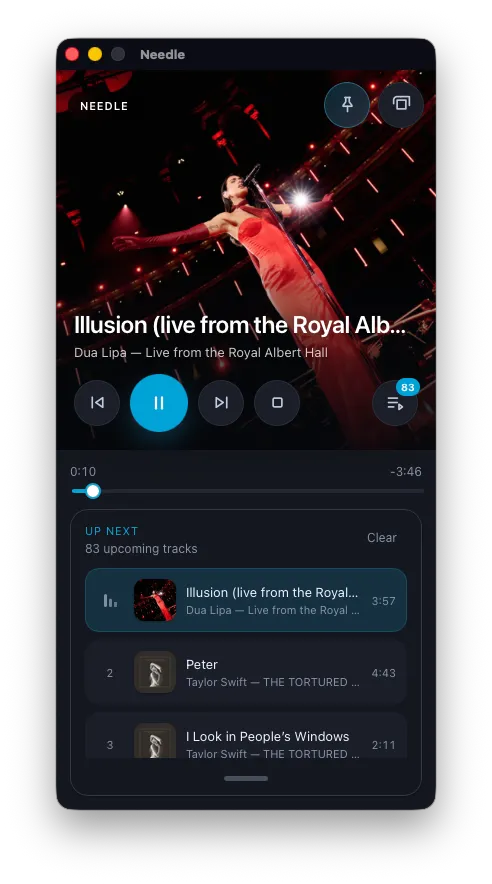
The mini player is a compact floating window for controlling playback without keeping the full Needle window open. It leads with full-bleed album art and an expandable queue.
Opening the mini player
Section titled “Opening the mini player”Click the mini player icon in the top-right corner of the main window.
Features
Section titled “Features”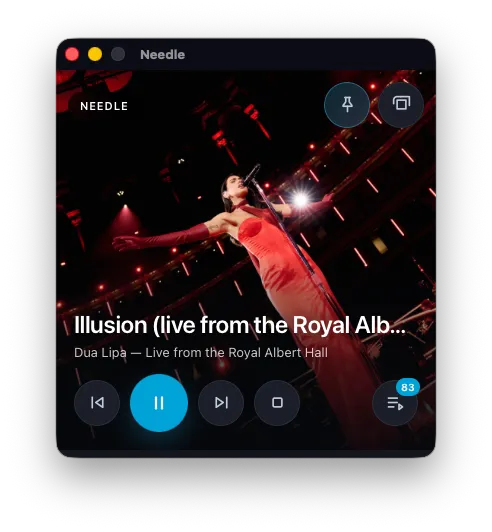
- Full-bleed album art for the current track
- Track title and artist
- Play / pause, previous, and next controls
- Progress bar
- Expandable, resizable Up Next queue — click to expand and see upcoming tracks
Moving the window
Section titled “Moving the window”Drag anywhere on the mini player to reposition it on screen.
Always on top
Section titled “Always on top”The mini player stays above all other windows by default, so it remains visible while you work in other apps. Toggle this with the pin icon in the top-right corner of the mini player.
Closing the mini player
Section titled “Closing the mini player”Click the close button on the mini player window. Needle continues playing in the background — only the mini player window closes.