Playback
Bit-perfect playback
Section titled “Bit-perfect playback”Needle uses mpv ↗ as its playback engine via JSON IPC. Audio is passed to mpv without any resampling, volume normalisation, or DSP — what’s encoded in your file is exactly what gets sent to your DAC.
This matters most for lossless formats like FLAC and ALAC, where any processing would defeat the purpose.
Playback bar
Section titled “Playback bar”
The bar at the bottom of the window shows:
- Cover art, track title, artist, and album — click the album to open the Album page with full metadata, track listing, and Wikipedia notes
- Seek / progress scrubbing
- Playback controls (previous, play/pause, next)
- Shuffle and repeat mode toggles
- Volume and mute
- Output device selector
- Format info — for example
FLAC · 44.1 kHz · 16-bit
Repeat can be set to off, repeat one, or repeat all.
Up Next queue
Section titled “Up Next queue”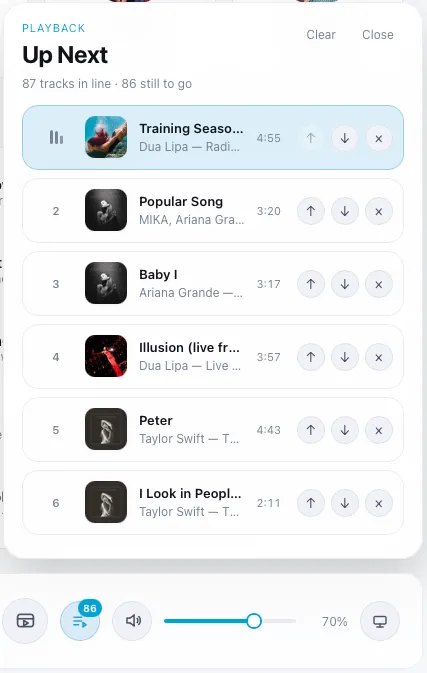
The queue shows your upcoming tracks with album covers and track counts. You can:
- Reorder tracks by dragging
- Remove individual tracks
- Clear upcoming tracks
- Jump directly to any queued track
Queue actions are available throughout the app — on tracks, albums, and playlist pages — as Play next and Add to queue.
Playback persistence
Section titled “Playback persistence”Needle restores your queue, selected track, repeat mode, shuffle state, and last position when you relaunch the app. The session is restored in a stopped state — Needle never autoplays on launch.
Equalizer
Section titled “Equalizer”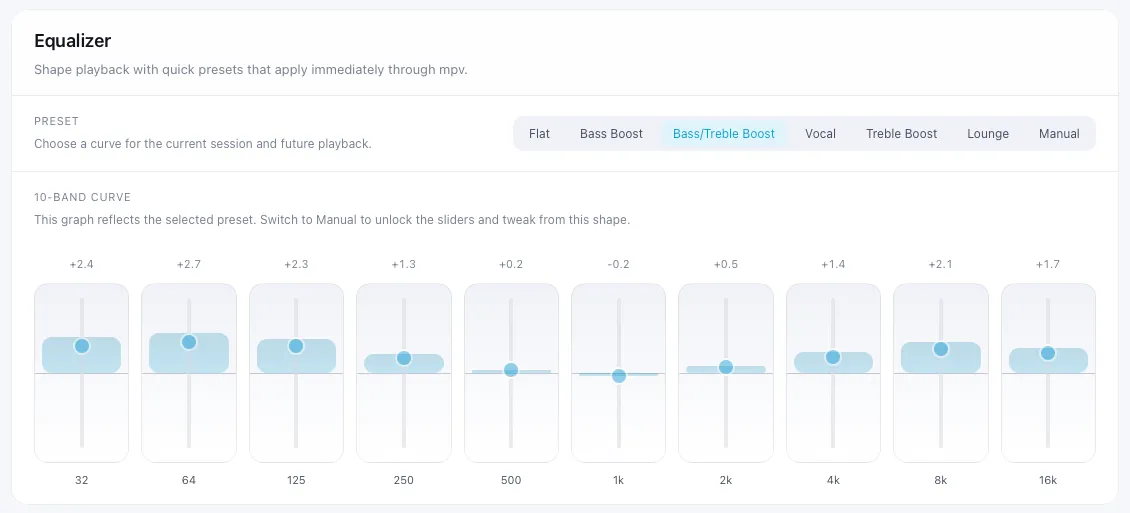
Six built-in presets are available: Flat, Bass Boost, Bass/Treble Boost, Vocal, Treble Boost, and Lounge. You can also dial in a manual 10-band EQ. Both are wired through mpv audio filters.
To open the equalizer, go to Settings → Equalizer.
Manual slider edits are applied on release to avoid playback interruption while adjusting.
Volume
Section titled “Volume”The default startup volume is 80% to avoid surprise-loud playback on first launch.